Showing posts with label tech. Show all posts

Monday, June 27, 2016

How I shared photos from my old camera on our vacation

On my recent vacation to England and Scotland, I had a photo problem. Yes, I took too many. But also, how would I share online photos that I took with my old point-and-shoot camera? On previous vacations, I took pictures with that camera and shared them when I got home. But it’s 2016 and wi-fi is everywhere, so why wait? I would be able to upload pictures that I took with my iPhone, but I didn’t want to rely on just a phone for pictures of Scotland’s green hills and valleys. I had a few options:

1) take my laptop and upload photos the old-fashioned way. But I didn’t want to shlep my laptop on this trip just for pictures.

2) buy a new camera with wi-fi capability. I looked at a couple of cameras on Amazon, but I don’t use a point-and-shoot camera often enough to make a new one worth the expense.

3) buy a wi-fi-enabled memory card. I thought about this too, but I have four 4 GB memory cards for my camera and I don’t need another one, for a camera I don’t use often.

What I settled on was option 4: use my wi-fi travel router to copy pictures from my camera’s memory card to my phone and upload them that way. I purchased a Hootoo Tripmate Elite travel router/backup battery in 2015 for the few times a year that I need a wi-fi extender for bad hotel wi-fi. It can turn a wired network into a wireless one or extend the range of an existing wireless network. It can also provide a private wireless network without Internet access. And it has two USB ports for charging, one of which doubles as a USB storage input. It doesn’t have a SD card reader slot, so I bought a $7 USB SD card reader on Amazon. The router automatically mounts the SD card reader as a storage location on the wireless network. The documentation on Hootoo's website suggests you can use the router to back up photos and videos from your phone to the USB storage, but I did the opposite. I have 128 GB of storage on my phone, so the phone would be my backup "drive."

At the end of each day of our vacation, I took the memory card out of my camera and inserted it into the card reader, then the card reader into the travel router. I turned on the router and joined my phone to the router’s private network. Then I used Hootoo’s router management app on my iPhone to browse the files on my memory card and copy the pictures to my phone. The app is a little confusing to use: it’s not clear that “Local Device” means your phone when you’re choosing a destination to copy. I get the feeling engineers designed the user interface without user input. But I was able to copy my photos from the camera card to the phone, then reconnect my phone to the hotel or B&B wi-fi so that I could upload them to Facebook and iCloud. This way, I could share my photos while we were traveling and I had the benefit of cloud backup. Even if I’d lost my camera or my phone, I’d have backups of all of my photos. 

One extra benefit of using this method to back up my photos is that with Apple’s confusing iCloud photo backup system, I can never be sure if the photos on my laptop’s Photos application are backed up into the same place as my photos on my phone. But the photos on my phone always wind up in iCloud and in Photos on my Mac and I don’t worry that I’ve lost anything. I should always copy the photos off my camera this way. Or Apple could simplify their photo management options. I won’t hold my breath on that one.

Tuesday, February 21, 2012

a few quick tech thoughts

I don't know why I keep charging my work-issued Blackberry. I never look at it. I can get my work email on my phone and my (also-work-issued) iPad, so I hardly ever use the Blackberry. I suppose it's more out of a sense of obligation that I keep it nearby and ready. I can't stand the interface compared to iOS, and the little keys have never been kind to my giant fingers.

Speaking of the iPad, I've been reading George R.R. Martin's Game of Thrones novels on my tablet with the Kindle e-reader. I wanted to read the books but I couldn't imagine carrying around large book after large book for weeks. It seemed to be the right time to give ebooks a shot. Aside from a bit of glare on the screen, I hardly notice I'm not reading a paper book. The fonts look the same as the printed versions, and while there are no page numbers, there's a page counter and index a tap away. I love that the Kindle app includes a free dictionary to look up those archaic medieval terms, and the search feature makes it easy to find a character's previous appearances. I do have to be careful when I'm carrying the iPad around at lunch, especially outside. It would break my heart to drop it.

I still like real, physical books for some things, like signed copies and sharing with friends, but I have to admit that ebooks are better than I expected. And given a dearth of space on my bookshelf at home, I think there will be more ebooks in my future. My future is now!

Wednesday, January 18, 2012

An obligatory SOPA/PIPA post

It's Internet Blackout Day, etc., etc. You know that already. The Unofficial Apple Weblog posted a long but worthwhile article this morning about why they're opposed to the bills. Chris Rawson describes in detail all of the effort and trouble he has when he wants to watch the latest episode of a new show from a major US network in New Zealand. It's maddeningly difficult, and it's all because the MPAA and RIAA want to prevent piracy. Here's the best quote I've read all day about this issue:


Here's how you stop piracy: You won't. Ever. There will always be people who want something for nothing, and no amount of trying is going to stop those people from looking for and finding it. Just accept it and move on.
Here's how you reduce piracy: Make it easier for people who want to access and pay for your content. That means no more arbitrary restrictions on what devices we can view it on. That means making the same content available to everyone, worldwide, simultaneously or as close to it as feasible, and at a fair price that consumers won't balk at.
I've already contacted my congressional representatives, even though Senators Schumer and Gillibrand are co-sponsors of the bill. Maybe all our opposition to it will sway them to withdraw their support. Maybe it will get them to tell the MPAA, RIAA, and other organizations behind the legislation to find different ways of solving this issue that don't involve censoring the innocent.

Wednesday, August 03, 2011

And now, a rant about Duke Nukem Forever


About two months ago, I pre-ordered Duke Nukem Forever for the Xbox 360.  I was a huge fan of Duke Nukem 3D in college and waited patiently but in vain for this follow-up game throughout the ‘90s.  By the time I moved to New York in 1999, I’d given up hope that the world would ever see the sequel.  I was as shocked as everyone else to find out a few years ago that the game would finally come out in 2011.

I received the game on June 14, its release date.  By that time I’d already read a couple of advance reviews and they were not positive.  But I’ve played mediocre games before, most notably the Star Wars: The Force Unleashed series, and I’ve had fun with them.  The Star Wars universe is always entertaining to me.  I hoped that I’d find a return to Duke Nukem’s world of misogyny, quips, big guns, and aliens would be as much fun as it was in 1996.  I was wrong.  I’ve actually quit playing the game part of the way through, and I’ve never quit on a game like that before.  It’s that bad.

Duke Nukem Forever is not fun to play.  It feels like work.  It’s a formulaic first-person shooter, and by that I mean you go through level after level of shooting halfway intelligent aliens and solving puzzles so you can shoot more aliens.  None of that gameplay is new to shooters, but in most shooters there’s something appealing about the effort.  For example, in Halo, the worlds in which you fight are gorgeous, lush tropical paradises, terrifying underground caverns, or creepy wrecked spaceships.  In The Force Unleashed, you play on familiar Star Wars worlds.  DNF is set in a half-destroyed Las Vegas, but there’s nothing particularly unique about the levels.  While there’s interactivity with the universe, I’m not interested in playing with toilets or making popcorn in a microwave.  Yes, you can throw objects at your enemies when you run out of ammunition (and you often run out of ammunition) but while you’re looking for a barrel or box, the aliens are killing you.

When you die, you reload the game from the last automatic save.  Duke Nukem Forever’s levels aren’t graphically intense but for whatever reason (bad coding? Bulky graphics engine? Poor overall game design?) they take over a minute to load.  And when you die often, that’s a lot of wasted time.  If I were enjoying the game play the long load times would be annoying, but in a game that feels like punching a clock, they remind you that you could be doing better things with your time.  You could be playing a better game.  At least DNF lives up to the “Forever” in its name.

After you’ve killed enough aliens, you face a big “boss.”  Again, bosses are a feature of just about every shooter I’ve ever played.  Duke Nukem’s bosses are gimmicky in that there’s a trick to defeating them.  I don’t remember the first boss I faced or how I beat it, but when I got to the “queen” alien with three giant breasts protected by impenetrable wings, I gave up.  It was such a predictable Duke Nukem thing to do.  I saw the gimmick right away: wait until the queen screams and spreads her wings, then fire rockets at the breasts.  But while you wait for her to scream, she’s throwing her offspring at you and trying to crush you with her tail (or something like that).  It was a pointless and frustrating moment in a game full of pointless and frustrating moments. 

That’s when I stopped playing.  I’ve gotten bored with games before and not finished them, or gotten distracted by another new game.  I never finished Grand Theft Auto: Vice City, GTA: San Andreas, or GTA IV, but with all three games I felt like I got my money’s worth.  (There’s always a chance I’ll go back to GTA IV if there’s a massive blizzard.)  And in the San Andreas and IV cases, I had a feeling going in that the games would be so big I’d never finish them.  I had every intention of playing Duke Nukem Forever from beginning to end, just to see where the story went and for the sheer nostalgia of shooting pig cops and flying monsters.  But I can’t do it.  I have a limited amount of time to spend on video games, and I’m not going to waste those precious hours on something that I don’t enjoy.  I played Call of Duty: Black Ops for about 45 minutes last night and had more fun in that time then in all the hours I put into Duke Nukem Forever.  There’s no chance I’ll ever put that game back into my 360.

So, does anyone want a slightly used copy of Duke Nukem Forever?

Tuesday, July 05, 2011

Who are these data-abusing monsters?

Gizmodo had this article about cellular carriers abandoning unlimited data plans.  In the comments, several people bragged about being grandfathered into unlimited data plans and how they used 17 GB of data last month, or in one case, 22 GB.  Who are these people?  Do they not have Wi-Fi anywhere in their immediate vicinity?  I'm the rare customer who actually likes AT&T's network, and I've rarely had problems with 3G coverage in New York.  It's slower than Wi-Fi, but it's fairly reliable.  Even so, I'd rather wait to listen to streaming radio until I'm in my apartment or office (both of which have abundant Wi-Fi coverage on fat Internet pipes) than listen to a stream while walking around outside.  And forget downloading music or apps while I'm out: I do that stuff indoors, in Wi-Fi, too.

The problem, as always, is that a small number of network users consume the most bandwidth, making it harder for the carriers to support the rest of us who use our phones sensibly.  I hope that these carrier issues will someday be a thing of the past, as Wi-Fi and WiMAX and other broadband wireless technological advances make it easier to get online anywhere.  Until then, if you believe Gizmodo, guard your unlimited data plan with your life.  Or if you're like me, get a home Internet connection, leave the house with all the music you'll ever need, and don't worry about it.

Thursday, December 23, 2010

My blog is now smartphone-enabled!

Thanks to Blogger in Draft, you can now read my blog on your mobile device of choice in a tiny-screen-friendly format.  I've been waiting for this feature.  Despite the relative dearth of content, it's been a big year for the blog.  Another redesign, the most pageviews I've ever had, and now I've gone mobile.  Maybe 2011 will be a bigger year. 

Thursday, July 08, 2010

cheating on my longtime love

It's been out for years, but I've stubbornly refused to try Google Chrome until now.  I love Firefox.  I even helped write a book about it.  But technology moves on and newer products come out, and as a geek I should make the effort to test them if I can.  So far my experience has been favorable.  Chrome imported all of my bookmarks and saved logins, so I don't even have to retype passwords in the new browser.  It does load faster than Firefox.  Chrome also uses less RAM than Firefox, but that's not a major selling point for me since I have 4 GB on my MacBook Pro and I don't usually run low on memory.

I'm going to continue using Chrome on one of my PCs at work (which only has 1.5 GB of RAM) the rest of the week and see if I notice any other benefits or drawbacks.  I don't think I'm prepared to leave Firefox behind, especially with version 4.0 coming soon.  But I'm open to experimentation.

Thursday, June 17, 2010

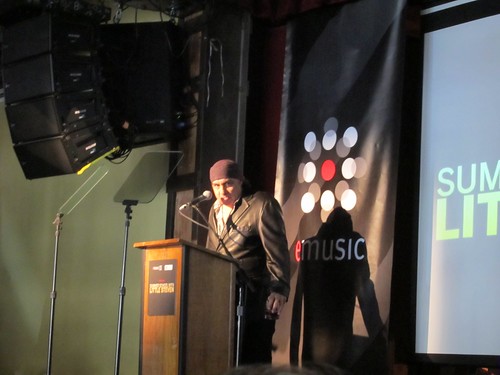
Summer School with Steven Van Zandt

On Wednesday night I had the opportunity to hear Steven Van Zandt of the E Street Band (and "The Sopranos") give a lecture at City Winery.  eMusic sponsored the event, the first in what I hope is a series of lectures and other gatherings for members of the music download service.  They billed it as a discussion of Van Zandt's ideas of what makes a great rock and roll band.  That concept initially sounded a little weak, content-wise, but I was intrigued enough to respond to the invitation anyway.  Who doesn't like free drinks and the chance to listen to a music legend?


There was a small crowd at the event, under 100 people.  Van Zandt talked for about a half-hour about the value of arrangers in rock music.  The lecture was much more interesting than I expected.  He said that all aspiring rock musicians start out as arrangers, as they learn how to play other people's music, and that being a great arranger makes you a better songwriter.  He illustrated his points with audio clips of Chuck Berry originals and The Rolling Stones' covers of those songs (some of which sounded like bootlegs from Van Zandt's collection), then he moved on to Bob Dylan and covers of his songs, and so on through the 1950s, 1960s, and 1970s.  He argued that the period from 1951 to 1971 amounted to a rock and roll renaissance.  And he said that the introduction of CDs was a scam, and that "digital music sounds so fucking bad."  I thought that was an interesting opinion considering who paid for the event.


After his talk, my friend Jessica and I went up to Van Zandt and chatted with him for a few minutes.  We thanked him for the lecture and he said that he thought it went well since he wasn't sure who the audience would be or how the material would be received.  Then we told him we are aspiring rock musicians ourselves, as a bassist and drummer, respectively.  When he heard this Van Zandt looked wary.  His eyes widened.  We thanked him again and moved along to allow others to greet him.  A moment later Jessica turned to me and said "I think he thought we wanted him to listen to our demo tape."  To our credit, we thought we looked really old for people trying to break into the business.

For more coverage of Wednesday's event, check out the Twitter hashtag #emusicsvz.  Several eMusic members, including me, live-tweeted the lecture and caught some of Van Zandt's other points that I may have missed.  I hope eMusic does other events like this one, because it's a fun way to meet other members, learn about music, and enjoy food and swag.  I'm glad I came back to the service after a brief break last year.  I just can't quit you, eMusic.

Monday, April 19, 2010

If this is the new iPhone, I'll keep my old one

Gizmodo has a scoop on what appears to be the next iPhone.  Gadget sites have posted blurry screenshots of new toys before.  This isn't a hazy third-hand report of something that may or may not be a real phone.  This is an actual prototype phone someone found in a bar in California.  Gizmodo's writers took the thing apart and confirmed that it has Apple hardware inside and a general Apple hardware feel to the outside.  Apple remotely "killed" the phone before the editors could play with the OS but everything else they were able to do indicated that it's as close as we'll get in April to a new iPhone slated for a June release.  It's as thorough a dissection of a prototype gadget that I've ever seen from a blog.

What makes me happy about this information is that there's not much in their analysis that makes me feel that I'll need to get my hands on a new iPhone this summer.  I'm really happy with the iPhone 3GS I bought last July.  I don't want to be one of those people who has to get the newest phone as soon as it's released every year.  I bought my 3GS with the intention of keeping it for two years.  From what I've seen of the new iPhone, I'll be happy with my old phone and the iPhone OS 4.0 upgrade when it's released later this year.

Monday, October 05, 2009

Puzzled, perturbed, and becoming peevish over Mac troubles

My MacBook Pro has been acting funny for the past few days. When I close the lid, the computer is supposed to go to sleep. It does sleep, but if I disconnect the AC adapter and leave it in sleep mode, eventually it turns back on or runs the battery down in some other way. Twice last week the battery ran out while the computer was in sleep mode and resting under my desk at home in a laptop bag. The first time that happened I assumed I'd left the computer turned on somehow. But the second time I was certain it was in sleep mode, yet when I got home the computer was off and the battery dead. I brought the Mac to work this morning. It was asleep when I put it in my backpack but hot to the touch when I took it out 30 minutes later. The system wouldn't wake up and I had to power-cycle it. It seems the computer had turned itself back on during my commute.

Along the same lines, the laptop's battery life has declined steadily over the past few weeks. The battery is less than a year old. I replaced it last December when the previous battery began to lose its capacity over the course of a few weeks. I'm sure I can get another battery through Apple support, but I wonder if the battery life and the sleep issues are related. I've also had weird issues with the OS. Last night I had to reboot before Photo Booth recognized the built-in iSight camera. System Preferences has given me the "beach ball" a few times. I couldn't even run System Profiler yesterday without rebooting. It's possible that some of these problems are happening because of the improper shutdowns, though that seems unlikely. I did upgrade to Snow Leopard about six weeks ago, though these problems only appeared last week. I've checked the system logs but they're not much help, though you'd have to be a developer to understand most of the entries in the log.

I am growing concerned. Let's call it "threat level: troubled." The computer is under warranty for another 16 months, so if I need help from Apple I can get it. But it's my baby, and I wouldn't be a good parent if I weren't just a little worried about what's going on under the keyboard. I'll try a few more self-help ideas like clearing the PRAM and looking at any other recent upgrades before I give up and visit my local Genius Bar. If I go that route, I just hope I get a real Genius and not some doofus who just got out of the training program. I've not been impressed with what I've heard about the newbies at the Bar.

Wednesday, September 09, 2009

Really early thoughts on iTunes 9

I seem to have become an early adopter. I had to grab iTunes 9 as soon as it "dropped" this afternoon. It took me about 25 minutes to download the 82 Mb installation file and roughly two minutes to install it. I launched iTunes and after the usual licensing page it went into "updating iTunes Library" mode. I had left my Time Machine backup disk connected to the laptop, and while iTunes claimed to be updating my library, my Time Machine disk was running. I didn't pay much attention at first, as Time Machine regularly backs up the disks during the day. But after 10 or 15 minutes and no change in the status, I took a chance and forced iTunes to quit. Then I disconnected the backup drive and re-launched iTunes. This time iTunes came right up. It must have detected a copy of my iTunes library on my backup disk and started to organize it. That's bad, iTunes. Leave my backups alone!

There's a slightly different look and feel to the interface. The icons along the left side have subtle changes. The smart playlists now have a gear icon instead of a note, so it's clear from the icon and the color that those playlists are different. The list view shows artists on the left and songs on the right, and the grid view has a white background instead of the older dark gray background. You can change the columns in the list view, and you can switch back to the older view with the columns on top. I'll have to play with it for a while to see which way I like it. The Podcasts page mimics the iPhone podcasts view by using a half-filled circle to indicate which podcasts you've listened to only in part.

More importantly for me, there's also an iPhone update to version 3.1. There are some video tricks and MMS enhancements in there, but the feature I like most is the ability to drag and drop your iPhone apps from iTunes. When the iPhone is connected to the computer, the Apps page shows you all of your iPhone apps by the "page" on the iPhone. You can move apps from one page to another and remove apps from the phone with the mouse. Now I can roughly organize my apps by type: one page for music-related apps, one for productivity, one for restaurants and movies, and so on.

Apple also introduced iPod Nanos with video cameras, updated the iPod Touch line with new hardware with more memory and faster video chips, and bumped the iPod Classic to 160 GB. I should say that they bumped it back to 160 GB, because I own a 160 GB Classic I bought two years ago. But this new Classic uses a one-platter hard drive, so it's thinner. But it's good to know that Apple still has an iPod for geeks like me who want to carry around all their music. And if my old Classic dies, I can replace it without spending too much or sacrificing space.

Friday, July 24, 2009

No more iPod Classics?

Gizmodo's Wilson Rothman writes about Apple's current iPod product line and the role of the hard-drive-based iPod Classic. There are few hard-drive players on the market now, and even Apple admits that they're selling fewer of them in favor of iPhones, Nanos, and iPod Touches. There's a dwindling customer base that needs a giant iPod to carry an entire music library around. Flash-based players are smaller, lighter, and have more features to offer than their disk-based counterparts. And there's always the longevity factor. A disk-based player has internal moving parts that will break eventually, while a flash-based player is more durable.

Like Rothman, I have a 160 GB iPod Classic and a 32 GB iPhone. Depending on my destination, I'll take both devices with me when I go out. I can't explain why I need to carry my entire music collection with me at all times. It's come in handy at those times when I've had an urge to hear a particular song or I need to look up a song for reference purposes. Most of the time I listen to a handful of podcasts or music I've recently acquired. I can listen to those things on my iPhone, since I've set up playlists that sync new music to the phone. Yet I carry around my now-clunky (by comparison) iPod Classic anyway. I have a few other reasons besides music hoarding for keeping the Classic around. It keeps a backup copy of my photos, and I've used it to move large files from computer to computer as well.

But my Classic isn't going to last forever. I can hear the hard drive clicking when I start playing an album or a long symphony, and my technical experience tells me that hard drive noises are not a good sign. I knew when I bought the Classic two years ago that it would most likely be my last disk-based player. If Apple made a 128 GB iPod Touch, I would buy it as soon as my Classic served up its last song. I could keep all of my music on it and use it as a web browser and mobile computer just like my iPhone. I wouldn't be as skittish about using a Touch at the gym as I am about my phone. I'd be a mess if either one took an accidental flying jump off the treadmill, but a dead music player is easier to replace than a subsidized phone.

Friday, July 03, 2009

A man and his toys

When I was growing up, I had no shortage of toys: Legos, Star Wars figures and ships, G.I. Joe figures and playsets, and Transformers, just to name a few. My brother and I would play together after school and after watching cartoons featuring some of these toys. As I got older, I knew that eventually I'd have to give up my toys and become a boring adult. I didn't want to be that kid in my neighborhood who was about five years older than me and my friends and clearly too old to hang out with us while we played with plastic Star Wars toys. But I also didn't want to give up my toys. At 12 years old, I actually worried about this upcoming change in my life.

Then I discovered computers and computer games, and I forgot about Transformers and G.I Joe. Just like that, they weren't cool anymore and I didn't care. Also, I'm sure puberty played some role in this change. It's hard to get the attention of girls when you're still bringing your Storm Shadow GI Joe guy to school. So computers and my Walkman became my new toys. I hauled a case full of cassette tapes to England in 1989 so I'd have music to listen to on the flights. I spent hours in front of the computer writing programs, playing games, and tinkering.

My adult life has featured a succession of computers and gadgets, all of which have fulfilled the role that toys used to play. I've run home from work to set up a brand-new computer. I've stayed up late at night playing games on the computer and on my Xbox. And I've carried my laptop to far more places than necessary, under the pretense that I *might* need it but mostly because I just wanted to have it with me.

My four primary "toys" are my laptop, my camera, my HDTV (and the cable box and Xbox that go with it), and my cell phone. The last one is the newest, as I've finally upgraded to an iPhone. I didn't want the iPhone when it first came out. It was expensive, it wasn't as fast as my Samsung flip phone, it looked fragile, and since it couldn't hold more than a few gigabytes of data or music, I decided to wait. Last summer's release of the iPhone 3G tempted me a little more, but I was happy with my old reliable cell phone. And I was still under contract for another six months. This summer, after another year of frustrated texting on my old phone's numeric keypad, I decided it was time to get into the market. Kate got an iPod Touch as a gift, so I got the chance to play around with it and try out the virtual keyboard. I found that I could deal with that feature and that I really liked having a full version of Safari available. I considered buying a smartphone from another manufacturer and I gave serious consideration to Nokia's E71. But the more I thought about it, the more I just wanted to get the iPhone already. Five years ago I bought a MP3 player that wasn't an iPod, in part because I didn't want to be an Apple guy. Two years later I was tired of dealing with my crappy MP3 player and bought an iPod. When I thought about buying a smartphone from another manufacturer, I remembered my previous experience and I didn't want to spend the next two years wishing I'd gotten the iPhone instead.

So now I've got my iPhone. I've only had it for 24 hours, so I haven't played with it that much yet. But from what I've seen and done so far, I think I'm in love.

Friday, June 12, 2009

"...something called the 'Internet'"

It's hard for me to believe it, but there was once a time when instant messaging, online shopping, and 3D multiplayer video games were but figments of our imagination. Tom Brokaw takes us back to that time in the video clip featured here. I remember most of the programs and computers shown in the video. I feel older than usual right now.

Tuesday, May 19, 2009

In-flight Wi-Fi? What about in-train Wi-Fi?

AirTran is in the process of rolling out WiFi to all of its planes by the middle of the summer. Some carriers offer Wi-Fi on some of their flights but not all of them, so AirTran will be the first carrier to offer it on all flights all the time. Delta had the Gogo in-flight Wi-Fi system on the flights I took to and from New Orleans last month, but I didn't pay for the privilege. I had brought enough in-flight entertainment options with me, and when I did get out my laptop for a few minutes on the flight home, I barely had enough room to use it. I tried writing the outline for a blog entry about the trip but I couldn't see the screen and type at the same time. I wasn't prepared to pay $8-$10 for mobile Internet when I couldn't read anything. I might give the Internet a shot on a future flight, but with the airlines charging me $15 to check a bag, I feel like they're already getting enough of my money.

However, I would be more interested in Wi-Fi access on Amtrak. I take the train to and from DC several times a year, and to Johnstown for Christmas. The three-hour trip to DC isn't so bad, but I start to get crazy on the seven-hour haul to Johnstown. The ticket for that trip is so cheap that I would gladly pay $10 or $12 for Internet access, even spotty, all the way to Johnstown. It's not that I need to be online that whole time; obviously, I've survived this long and many other trips without it. But it would be a great way to pass the time, in addition to the books and movies I already bring with me. Amtrak has tried onboard Wi-Fi before but I haven't seen or heard about anything on their trains in a few years. I'm sure there are significant technical hurdles. Any Internet access system would have to utilize the cellular network , and on a fast-moving train, you have the same problems as you have in the air: multiple clients being handed off to cell towers at high speeds. But it's 2009 and we're all well-connected travelers. Amtrak, let's get this done already. If the buses to Boston and DC can do it, I'm sure you can too.

Thursday, April 23, 2009

GeoCities goes away

Many, many years ago, I had a personal web site on a Georgetown University web server that I built myself on a Windows 3.1 PC. That web server is still one of my proudest accomplishments as a geek, which is one reason I continue to tell that story. When I graduated and that server had to be retired (separate incidents, but they happened around the same time), I had to move my site to another host. Since I didn't have any bandwidth to host a site at home and work was no longer an option, I signed up for GeoCities. At the time it seemed like a great idea. They offered free web hosting and easy FTP uploading for data. What I didn't find out until later was that having a web site on GeoCities was like running your business out of a flea market. The sites themselves had weird URLs with goofy names like www.geocities.com/LosAngeles/7328/phil.html where you chose the "neighborhood" you wanted (LosAngeles) and then GeoCities assigned you a number that was "your" address in the neighborhood. The other sites on GeoCities were wacky pages that I wanted nothing to do with. I was ashamed just to be associated with them. I kept my site on GeoCities for about six months, until I got a new home computer and a dial-up account with web hosting privileges. I moved away from the flea market and never looked back.

Well, GeoCities became a Yahoo! property years ago, and now it's going away. I can't say I'll miss it, especially as I wasn't really aware it still existed and that anyone used it.

Wednesday, March 11, 2009

I would have just called the cops

Here's another example of how NOT to use Twitter. When a drunk, smelly, and possibly homeless man wanders into your studio apartment and passes out in your bathroom, do not update your Twitter feed and ask your followers what you should do. And it's a bad idea to set up a video feed to broadcast you going into the bathroom to see what this hobo may or may not be doing in there. Your phone, which probably has a QWERTY keyboard on it, also has a number pad. You can use it to dial 911. In fact, your phone has an emergency call feature which should call 911 if you can't type that number yourself. I can't speak from experience, but I think the police tend to arrive quickly when you call about an intruder. Also, lock the front door. You live in a city, not some friendly rural hamlet.

This guy is lucky that the worst thing to happen as a result of his inaction is that he now has to fumigate his apartment. I've smelled some fragrant vagrants on the subway. If one of them stumbled into my apartment and passed out in the bathroom, I think I'd have to move.

Friday, February 27, 2009

The perils of all-in-one devices

Wilson Rothman, one of the editors at Gizmodo, wrote this delightful screed about his experience with a balky Epson printer. He tried to print out 15 pages of black-and-white text, only to have the printer stop and warn him that he was out of several types of color ink. Replacing the ink cartridges didn't help and he was left with a printer that refused to print anything, even though the document didn't require any color ink. Rothman's problem reminds me of my own recalcitrant Canon all-in-one (scanner/copier/printer) inkjet printer. I bought the Canon MP500 all-in-one in August 2006 when I needed a printer in a hurry for a project. I did a little research, read a few favorable reviews, and found the printer at Best Buy for a decent price. It was fine for about 18 months and I especially enjoyed having a scanner at home again. I started the long (and as yet, unfinished) process of scanning my old photos. Someday I will get back to that project and complete it.

Last spring, my printer started having issues with the ink cartridges. For about a year now, the printer refuses to work, claiming that it can't recognize one or two of the color cartridges. The current cartridges are Canon brand, as I've read enough stories about printers having difficulties with third-party cartridges. My cartridges are also nearly brand-new, but the printer claims that they're either empty or unknown. For a while I was able to restart the printer several times and on the third or fourth boot-up it would recognize its own cartridges and start working. Since I moved to Brooklyn, the printer hasn't worked at all. It's become an extra-large paperweight in my bedroom.

The most frustrating aspect of this cartridge problem is that I don't need to print that often, but I do need to use the scanner. However, the printer won't do anything as long as it doesn't recognize the cartridges. There is no logical reason why the scanner can't continue to work when the printer part of the device is out of order. But the printer's startup sequence requires that all parts of the device be fully functional, so I'm left with a hunk of plastic and glass that is entirely unusable in its current condition.

The easy fix would be to buy another set of ink cartridges and hope that my existing set came from a bad batch. And given the cost of ink, that path would make more sense than buying a whole new all-in-one printer. I'm going to order another set of cartridges as soon as I can remember to check the printer to see which ones I need. But I'm going to want to punch someone if I go that route and then find out my printer still doesn't work. Canon, you're on notice.

Wednesday, February 18, 2009

Spending money I didn't really need to spend

I bought iLife '09 on my way home from work last night. I was underwhelmed by the iLife '09 demo at MacWorld last month and at that time had determined that I could live without the new enhancements to iPhoto, iMovie, and the other programs in the suite. But after I ran the first draft of my tax returns and saw that I should get a decent sum back from the federales, I changed my mind. Late last night I installed the upgrades and set about place- and face-tagging my photos. The advantages of place-tagging and face-tagging are that once you've tagged all your photos, you can search for photos by person or location. Since I organize my photos by date, time, and then location, searching by place and/or person could be useful. For the $80 I spent on the software, I certainly hope it's useful.

The place-tagging didn't take that long, but it took me a while to figure out how to get specific with my pushpins. I didn't want to tag every photo taken in the five boroughs as "New York," when some of them are specifically in Central Park, or at a particular location in Brooklyn like Floyd Bennett Field. After making a few adjustments I finished the process about an hour later.

By that time iPhoto had completed its face-scanning process, so I set about face-tagging some of my recent photo sets. I am not too impressed with the facial recognition so far. It has trouble with people wearing glasses or sunglasses, or with heads tilted slightly. I have had to correct or add face tags to most of the photos I've adjusted up to this point. But it is fun to go back through some of these photos and see who iPhoto knows and who it doesn't know. Also, it helps me to remember the names of all the people I met at the various weddings I attended last year. I know that I don't need to tag everyone; it's unlikely that I'll want to search for friends of friends that I met one time in my photo collection. But if I tag the major friends, it will make a difference for future searches.

As for the rest of the product suite, I spent a few minutes in iMovie this morning just poking around, and I haven't tried the updated version of GarageBand or iWeb yet. I don't own a guitar or a piano, so I don't think the celebrity lessons feature of GarageBand will be of much use to me. And this blog is the only web site I maintain at the moment so iWeb might not get much use either. But I couldn't pick and choose which applications I wanted to buy so I got the whole suite. I just hope Apple doesn't release a super-updated version next year, because I'll have to buy that too.